Tag: WordPress

  • Exploring Windows 8.1 Pro: Turbocharging My Old Sandy Bridge i7 with OBS, Stream Deck, and More

    Exploring Windows 8.1 Pro: Turbocharging My Old Sandy Bridge i7 with OBS, Stream Deck, and More

    The last few weeks were about exploring Windows 8.1 Pro. My goal was to see if I could get my good old Sandy Bridge i7 fully engaged with the Sabertooth Z77 motherboard. After some time, I installed all the drivers after much trial and error. Upon initial installation, I noticed that the operating system runs faster than Windows 11.

    Yes, I know, Windows is super old, but it runs so nicely with my old computer. Also, I got to toy around with Lucid GPU to CPU (iGPU), but I wasn’t sure if it had any impact because I’m running an RTX 3060 Ti OC. I accomplished a modest overclock of 4.6 using Liquid Metal thermo solution.

    More recently, I became fascinated with Obsidian, Git, Open Broadcaster, OpenDeck, and Stream Deck. I wanted to see if it was possible to install all of them successfully on Windows 8.1 Pro. The challenge was finding the correct version that allows the installer to do its job. Obsidian was locked at 1.1.16, but worked nicely with most of my plugins. Surprisingly, the release is from 2023. I was impressed that the team supported Windows 8.1 for so long. Meanwhile, GIT installed perfectly without any tweaks.

    Moving to OBS and Stream Deck, I faced many issues. Especially getting them to talk to each other. OBS has a script that allows me to connect via sockets. However, BarRaider’s OBS Tools don’t work on version 27. What’s worse, using the hotkey trick with OBS is not effective because the program has to be in focus.

    I ended up going to Gemini AI and asking it to write me a Python script to communicate with the sockets. The goal was to switch scenes. I created two batch files with commands that called my Python script. It took a while, but I successfully got the OpenDeck to use “Run Command”, engaging OBS.

    C:\Program Files\obs-studio\data\obs-plugins\frontend-tools\scripts\obs_controller.py

    Meanwhile, OBS and Elgato Stream Deck software are locked to an older version and require me to extract the files from the installer and manually copy them. I used a GitHub repository called ElgatoLegacy. Afterwards, I had to copy over a few DLLs, and boom, the program runs with its default programs. However, installing plugins isn’t easy. Since the Elgato community moved to the online marketplace, it no longer supports my old version.

    Eventually, I got both Stream Deck, OpenDeck, and OBS working. I was so thrilled that I could fully engage my old hardware and live stream or record while using my favorite tools. Feel free to reach out to me if you have any thoughts or ideas.
  • How to Customize WordPress Prompt Thumbnail?

    How to Customize WordPress Prompt Thumbnail?

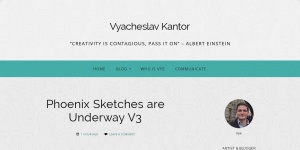
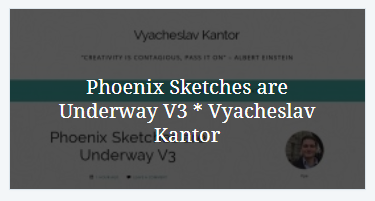
    I’m not satisfied with the WordPress “prompt thumbnail” screenshot. The created screenshot is a result of a pingback. Is it possible to customize the thumbnail? Is it crazy to say that we want somebody to click on our little square box to visit our blog? In my opinion, half of my thumbnail doesn’t offer any useful summary of my blog post. For example, what is the point of showing a small tiny menu and a title? In other words, the main menu is hard to read at that size. Also, why is the name of the post displayed twice? First in white overlayed, then on the image.

    Prompt Thumbnail 📚

    What I do know is that if I change my theme, restart, then the screenshot changes. What exactly takes the screenshot, I do not know. I do know that it has something to do with the pingback I create using the prompt. For example, today’s prompt is conversant. Last night, I created a blog post on my latest sketches using this technique. 

    How does it work?

    Interestingly, there is a documentation about how it all works. If you’re not familiar with the daily prompts, take a look at the article challenge-instructions. If you want to learn more about the prompts, please read the article comments pingbacks. Granted if you are lazy like me, see how WordPress defined pingback below.

    A pingback is a particular type of comment, when you link to another blog post, as long as the other blog is set to accept pingbacks. To generate a pingback, link to another WordPress blog post. If that post has pingbacks enabled, the blog owner will see a pingback appear in their comments section. 

    WordPress – Pingback

    Bloggers ✍

    What do you think of the issue above?

    • Change the theme, so it caters to the screenshot?
    • WordPress do something about it?
    • Leave it alone, and it works well for my needs.
    • Is there anything else I should add to this list?

    Here is a Phoenix Sketch for you :) It could be useful in my stories.

    Phoenix Red Color Sketch
    Phoenix Red Color Sketch
  • 4 Helpful WordPress Plugins: Increase Your Reach

    4 Helpful WordPress Plugins: Increase Your Reach

    4 Helpful WordPress Plugins Increase Your Reach
    4 Helpful WordPress Plugins Increase Your Reach

    A few days ago, I had looked at my WordPress follow button because I don’t like how it placed and it’s style. I needed a way to hide and show the follow my blog button. In fact, my inspiration came from the original style. So, I started googling for helpful WordPress Plugins. For example, I need a way to attach my follow button to the bottom right and fade it when the user scrolls the mouse wheel. Despite my journey with WordPress support, I managed to find a few plugins/CSS to help me with the result I needed. Here is a list of useful items that helped me:

    The 4 Plugins

    Headroom.js is a lightweight, high-performance JS widget (with no dependencies!) that allows you to react to the user’s scroll. The header on this site is a living example, it slides out of view when scrolling down and slides back in when scrolling up.

    Ad management plugin with many advanced advertising features. Supports all kinds of WordPress ads including Google AdSense, contextual Amazon Native Shopping Ads, Media.net and rotating banners.

    Helpful WordPress Plugins: Let’s Customize 🏗️

    The nice thing about this combination of plugins is that I can customize the look and feel. In other words, I popped in some JavaScript, CSS and got a few new features. For example, when the user scrolls down, the button hides or doesn’t bother you while you read my posts! Also, that alone was a trill because of how fluidly it disappears. Yet, Headroom works on your call to action and navigation headers. In other words, hide your header until you need it. Please let me know if you feel that I should add more to this list? 

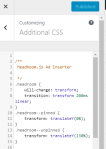
    .headroom {
      will-change: transform;
      transition: transform 200ms linear;
    }
    .headroom--pinned {
      transform: translateY(0%);
    }
    .headroom--unpinned {
      transform: translateY(130%);
    }
    
    div.code-block-1:hover {
      opacity: 1.0;
      transition-timing-function: linear;transition: opacity .25s ease-in-out;
      -moz-transition: opacity .25s ease-in-out;
      -webkit-transition: opacity .25s ease-in-out;
    }
    
    div.code-block-1 {
      opacity: 0.4;
    }

    Question for you⁉️

    I added some ads in between posts. What do you think? Bad idea? distracting? How do you plan to make cash from blogging? Let me know in the comments below?

    Reading List 📚
  • WordPress Comments Rant & Day In Review

    WordPress Comments Rant & Day In Review

    WordPress Comments Rant
    WordPress Comments Rant

    WordPress Comments Rant 💢

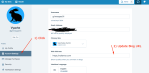
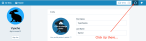
    The other day I was troubleshooting WordPress comments. Stoner and I were discussing artwork, but she pointed out that if somebody clicks my name they go to the wrong place. Also, I was under the impression that we were both viewing the comments from the desktop. Yet, Stoner was viewing the comments from the reader. For example, after a fury of images being sent back and forth, I learned that she was correct in saying that site was not right. In fact, she was navigating to a site called grimreaper01.wordpress.com. As a result, I spoke to WordPress support and they pointed out that I needed to go to my account setting and just update a few fields. Thus, the moral of the story is use screenshots! I think we spent a few hours in plain confusion (see Worker Bee Story below).

    The rest of the day 🐰

    That morning was interesting. I got up after being extremely tired. In other words, I was up late coming up with a featured picture for my blog post. Website Mission – 6 Strategies for beginners…Sunlight is in my eyes, while I got some of my clothes ready. Saw my mom. She was already up making breakfast. My plan was to quickly get some clothes ready so I can spend more time on publishing my blog post. Then I remembered that I had to connect my blog post with the prompt today. With the frustrations building, I didn’t know how to use blink in a sentence. I went online and searched how to use it a sentence. Remember, I’m half awake, so yes this is how I think when I’m sleep deprived. Then I selected something that made sense.

    The Night Before 🌃

    The night before I worked tirelessly on making my featured image. For example, I used a software called Spark. It’s useful because it lets you quickly create designs without actually being a designer. In other words, it provides you with starter templates for any social media platform. This helps me because it removes the guesswork from figuring out how big to make something.

    Later that day ☀️

    Okay, I’m on the train to work… Happy that I published my post. I realized I forgot my toothbrush. 😭 This was important because I will be visiting my girlfriend place after work. Okay fine, I’m over it now… During my commute, I like to do this interesting thing ~ draw. For example, I slap on some nice beats and continued work on my drawing for Dronstadblog.🔥

    The Worker Bee 🐝

    When I got to work, I had lots of code to write for my project. Yet, I wanted to focus on my blog and promoting it. During lunch, I watched some PluralSite videos on ZBrush. Afterword, I decided to hang out with my favorite bloggers. After I posted a few interesting comments, I decided to visit  Stoner blog. Then learned that my WordPress comments don’t show my site. 🤦 In other words, this whole time I was linking to some other magical site that doesn’t exist. As a result, using WordPress support, I was able to get help and fix my WordPress comments.

    Evening Whiskey Shot 🥃

    Later that night we went to a bar. I didn’t know these people. Yet, I still want. You never know, you might just meet another artist. The group was mostly talking about sports. For example, NBA or basketball. Yet, I don’t watch sports, so I stayed quiet for a bit. When they got off the topic, I was free to try out my conversation skills and connect with these people. To my surprise, the person who organized the event was an artist. On the other hand, she wasn’t practicing much because she is working as an office admin. Bang!! We all got out of our seats to see what that noise was! A guy in our group was laying on the floor. His chair exploded underneath him. I was about to break down laughing. Yet, I hesitated, I don’t know how candid I will sound if I start laughing my ass off.  For this reason, we all got whiskey shots from the manager.

    Home Run 🏃

    After the bar, I found out that the Microsoft store stopped doing Hololens demo after 4 pm. The store is nearby the bar and we had made plans to visit. Then we rushed to catch the subway train. Yet, somehow we got on the wrong train. When we got off, we had to walk two avenues. I didn’t complain, cos I actually like walking, so it was fun. Eventually, we caught the train and made our way home.

    Reading List 📚
  • Sign Language with Simsigns

    Sign Language with Simsigns

    Sign Language with Simsigns

    Ever since I got involved with programming I was always interested in learning new languages, but I didn’t get into all of them, like sign language. Then I met somebody who needed help getting her signs out into the world-wide-web. She sought to teach others through technology because everyone is moving toward web and mobile world.

    Every week or so, we sit down and draw up sign using the Paper App on the iPad and save them into simsigns. If we can’t draw them, we just shoot a quick picture and move on to the next letter of the alphabet. We are planning on teaching another app, so stay tuned.

    letter N
    letter N

  • PC Repair @ 360mobile

    PC Repair @ 360mobile

    pc repair @ 360mobile

    PC Repair is needed almost always. My friend and I worked on a side project but had nowhere to display our information, so we decided to turn it into a website. He wanted an area to show his repairs on iPhone’s and PC and the services he provides.

    360Mobile.wordpress.com

    Initial Setup

    We started by first brainstorming ideas on Skype and come up with a long list:

    1. Repairs
    2. Tutorials
    3. Video
    4. Keeping computers healthy
    5. Computer
    6. Overclock
    7. iPhone
    8. Virus
    9. iPad
    10. Networking
    11. Business
    12. Prices
    13. Games
    14. Entrepreneur
    15. General
    16. Mobile
    17. CdRom
    18. Computer case
    19. Cup
    20. Blackberry
    21. Mods
    22. Software
    23. Updates
    24. Hard drive
    25. Printers
    26. Troubleshooting
    27. Water cooling
    28. Sleeping
    29. GPU
    30. SSD
    31. PSU
    32. Fans
    33. Tubing
    34. Lighting
    35. Windows 7
    36. Windows 8
    37. Windows up
    38. Mac OS
    39. Microsoft software
    40. Adobe

    Afterword, we made a short list out of the above to represent categories:

    • Hardware
    • Software
    • Troubleshooting
    • Mods
    • Tutorials

    Template

    It was simple to choose a template, all we had in mind was the idea of it being mobile, so we choose a template that was responsive to any media.

    360Mobile
    360Mobile